this animation was made from these 26 lines of JS:
render(function* () {
	const box = new Box({
		position: [250, 250],
		dimensions: [250, 250],
	});

	yield* delay(0.5);

	yield* box.animateColor(WHITE, RED, 0.5);
	yield* box.animateRotation(0, 2 * Math.PI, 0.5);

	const startPos = [250, 250];
	const endPos = [1420, 580];

	yield* all(
		box.animatePosition(startPos, endPos, 2.0, elastic),
		box.animateRotation(0, 2 * Math.PI, 2.0, elastic),
		box.animateColor(RED, GREEN, 2.0, elastic),
	);

	yield* all(
		box.animatePosition(endPos, startPos, 2.0, elastic),
		box.animateRotation(2 * Math.PI, 0, 2.0, elastic),
		box.animateColor(GREEN, RED, 2.0, elastic),
	);
});
which is all powered by ~100 lines and no dependencies (you need a web browser though sorry).
what am i looking at ?
if the function* and yield* syntax is understandably unfamiliar to you, keep reading or skip ahead to the next section.
generator functions are a secret third kind of function, alongside regular and asynchronous functions. they unlock a lot of interesting possibilities. in a nutshell, generator functions are functions you can pause and resume.
you can define a generator function using function*, and return execution to the caller by using the yield statement optionally with a value.
function* test() {
	yield "one";
	yield "two";
}
to use it, call test() to recieve a generator object that you can advance whenever you want.
const generator = test();

console.log(generator.next()); // { "value": "one", "done": false }
console.log(generator.next()); // { "value": "two", "done": false }
console.log(generator.next()); // { "value": undefined, "done": true }
yield* lets you delegate the power of yielding to another generator.
function* testTwo() {
	yield* test();
	yield* test();
}

console.log(generator.next()); // { "value": "one", "done": false }
console.log(generator.next()); // { "value": "two", "done": false }
console.log(generator.next()); // { "value": "one", "done": false }
console.log(generator.next()); // { "value": "two", "done": false }
console.log(generator.next()); // { "value": undefined, "done": true }
you can also use a generator with a for .. of loop. here’s a generator that yields an infinite list of even numbers to work with.
function* evenNumbers() {
	let n = 0;

	while (true) {
		yield n;
		n += 2;
	}
}

for (const n of evenNumbers()) {
	// n: 0, 2, 4, ...
}
animations as generators
so, generators let you do some work on demand and keep your state. let’s try representing the movement of a box like this over time.
for now, our box will just contain a position vector.
type Vec2 = [number, number];

type Box = { position: Vec2 };

const box: Box = { position: [0, 0] };
and we’ll render at 60 frames/second.
const FPS = 60;for our animation to last 1 second long, we’ll need 60 frames of work. 2 seconds will require 120 frames, and so on.
function* move(box: Box, from: Vec2, to: Vec2, duration: number) {
	const frames = duration * FPS;

	// ...
}
on every frame, we’ll need to linearly interpolate from our starting position to our ending position, so i’ll define a helper for that.
const lerp = (start: number, end: number, progress: number) =>
	start + (end - start) * progress;

const lerpVec2 = (start: Vec2, end: Vec2, progress: number): Vec2 => [
	lerp(start[0], end[0], progress),
	lerp(start[1], end[1], progress),
];
example usage of lerp
lerp(start: 0, end: 1, progress: 0.5) = 0.5lerp(start: 0, end: 10, progress: 0.5) = 5.0lerp(start: 100, end: 200, progress: 0.75) = 175.0
the amount of interpolation (0.0 - 1.0) that we’ll do each frame will be determined by our frame index divided by our amount of frames. after doing the work in each frame, we’ll yield to return execution to the caller.
function* move(box: Box, from: Vec2, to: Vec2, duration: number) {
	const frames = duration * FPS;

	for (let i = 1; i <= frames; i++) {
		box.position = lerpVec2(from, to, i / frames);
		yield;
	}
}
let’s test it,
const gen = move([100, 100], [1000, 100], 1.0);

while (!gen.next().done) {
	console.log(box.position);
}[115, 100]
[130, 100]
[145, 100]
[160, 100]
[175, 100]
[190, 100]
[205, 100]
...
[895, 100]
[910, 100]
[925, 100]
[940, 100]
[955, 100]
[970, 100]
[985, 100]
[1000, 100] output
looks about right! let’s actually draw things to a screen to see it though.
const canvas = document.querySelector<HTMLCanvasElement>("#canvas")!;
const screenWidth = (canvas.width = 1920);
const screenHeight = (canvas.height = 1080);
const ctx = canvas.getContext("2d")!;

// Move box from (x: 375, y: 540) -> (x: 1,545, y: 540) over 1 second
const gen = move(
	box,
	[375, screenHeight / 2],
	[screenWidth - 375, screenHeight / 2],
	1.0,
);
on every frame, let’s poll our animation generator once and redraw our canvas.
function onFrame() {
	// Advance animation generator
	if (gen.next().done) return;

	// Clear screen with white
	ctx.fillStyle = `rgb(255 255 255)`;
	ctx.fillRect(0, 0, screenWidth, screenHeight);

	const [x, y] = box.position;
	const [width, height] = [250, 250];

	// Draw box red, centered at x, y
	ctx.fillStyle = `rgb(233 116 81)`;
	ctx.fillRect(x - width / 2, y - height / 2, width, height);

	// Run again next frame
	requestAnimationFrame(onFrame);
}

onFrame();
… the movement is quite a bit unnatural. instead of interpolating between positions linearly, let’s use an easing function
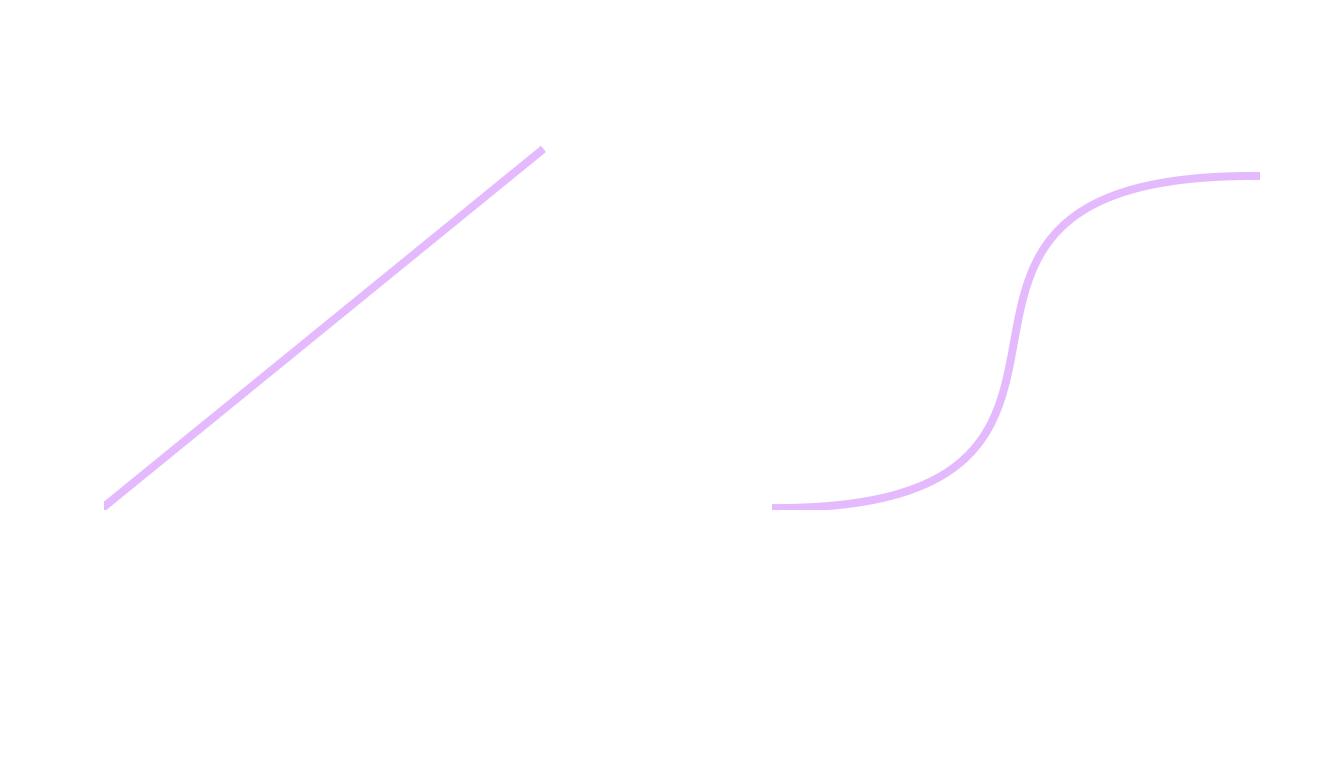
function* move(box: Box, from: Vec2, to: Vec2, duration: number) {
	const frames = duration * FPS;

	for (let i = 1; i <= frames; i++) {
		box.position = lerpVec2(from, to, i / frames);
		box.position = lerpVec2(from, to, easeInOutSine(i / frames));
		yield;
	}
}animation flow
animating one property is cool and all, but we should be able to do multiple things sequentially. and also at the same time.
to execute multiple animations sequentially, let’s define a generator function for our entire animation and delegate to the animations we want.
const gen = move(
	box,
	[375, screenHeight / 2],
	[screenWidth - 375, screenHeight / 2],
	1.0,
);

function* scene() {
	const startPos = [375, screenHeight / 2];
	const endPos = [screenWidth - 375, screenHeight / 2];

	// Delegate to animation 1
	yield* move(box, startPos, endPos, 1.0);
	// Delegate to animation 2
	yield* move(box, endPos, startPos, 1.0);
}

const gen = scene();
if we’re trying to get multiple animation generators to run at the same time, all we need to do is poll them at the same time.
function* all(...generators: Generator<any, any, any>[]) {
	while (true) {
		// Poll every generator at once
		const results = generators.map((g) => g.next());

		// If we're all done, exit
		if (results.every((res) => res.done)) break;

		yield;
	}
}
for example in yield* all(one(), two()), every frame all will advance one and two before yielding.
we need another property to animate before testing these new abilities, so let’s make color animatable.
// ...
type Vec3 = [number, number, number];

const RED: Vec3 = [233, 116, 81];
const GREEN: Vec3 = [175, 225, 175];

type Box = { position: Vec2 };
type Box = { position: Vec2; color: Vec3 };

const box: Box = { position: [0, 0] };
const box: Box = { position: [0, 0], color: RED };

const lerpVec3 = (start: Vec3, end: Vec3, progress: number): Vec3 => [
	lerp(start[0], end[0], progress),
	lerp(start[1], end[1], progress),
	lerp(start[2], end[2], progress),
];

function* color(box: Box, from: Vec3, to: Vec3, duration: number) {
	const frames = duration * FPS;

	for (let i = 1; i <= frames; i++) {
		box.color = lerpVec3(from, to, easeInOutExpo(i / frames));
		yield;
	}
}

function draw() {
	const [x, y] = box.position;
	const [r, g, b] = box.color;
	const [width, height] = [250, 250];

	// Draw box, centered at x, y
	ctx.fillStyle = `rgb(233 116 81)`;
	ctx.fillStyle = `rgb(${r} ${g} ${b})`;
	ctx.fillRect(x - width / 2, y - height / 2, width, height);
}
and let’s go. we’ll animate position and color at the same time now.
function* scene() {
	const startPos = [375, screenHeight / 2];
	const endPos = [screenWidth - 375, screenHeight / 2];

	yield* all(
		move(box, startPos, endPos, 1.0),
		color(box, RED, GREEN, 1.0),
	);

	yield* all(
		move(box, endPos, startPos, 1.0),
		color(box, GREEN, RED, 1.0),
	);
}
conclusion
to actually render these to videos you can use Mediabunny or some other method.
there’s so much more you can do to very easily add onto this. all you would need to animate rotation is to add it to the Box, define a generator function to go between 2 values (we already have lerp), and draw rotated to the screen. that’s it! same concept with width, height, opacity, borders, blur, etc.
some more improvements include:
- ability to sleep
- render multiple elements (this would be 1 for loop lol)
- animation functions take in custom easing functions
- making elements classes and leaving draw logic there
- circles, text, images, videos
- layout system …
this was inspired by Motion Canvas, which (i believe?) coined the idea of using JS generators for procedural animations. working in MC felt a bit too much like black magic (in a good way) for me, so i tried making this tiny implementation. i haven’t looked at MC’s source code so i cannot say how similar implementation details are.